
When preparing computer vision pipelines, choosing between annotation standards directly impacts ingestion speed, framework compatibility, and downstream model accuracy. While modern deep learning architectures have largely consolidated around standard tooling, legacy projects, benchmark evaluations, and internal labeling tools often output different schemas. Two of the most widely referenced standards in academic research and production pipelines are COCO and Pascal VOC.
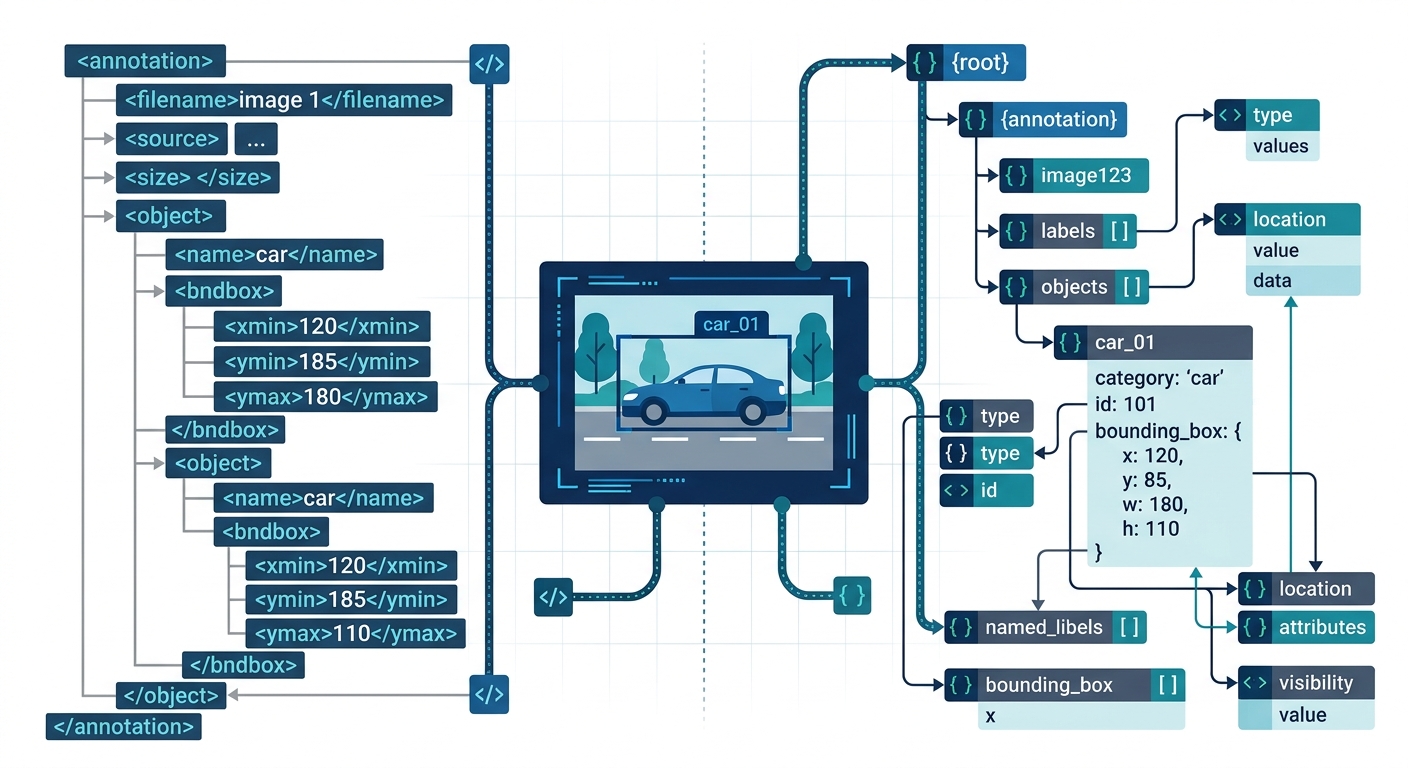
Understanding the technical trade-offs between the COCO vs Pascal VOC formats is essential for data engineering teams, ML engineers, and annotation managers designing scalable training workflows.
COCO vs Pascal VOC: The 7 Crucial Technical Differences
Both schemas originated from influential benchmark competitions, but they were built around fundamentally different design philosophies. Understanding the practical differences between the COCO and Pascal VOC data format for Object detection helps teams prevent costly data engineering refactors.
1. Data Serialization Architecture: Monolithic JSON vs. Distributed XML
The most immediate distinction lies in file management and serialization syntax:
- Pascal VOC XML annotation format: VOC stores annotations in separate
.xmlfiles corresponding to each individual image (for example,image_0001.jpgpairs withimage_0001.xml). While this makes adding, removing, or inspecting single images straightforward, processing thousands of files requires substantial disk I/O operations and repetitive XML parsing. - COCO dataset format JSON structure: COCO uses a centralized, single-file JSON schema per dataset split (such as
instances_train2017.json). All image metadata, category maps, bounding coordinates, and segmentation vertices live in this unified tree. This design enables fast in-memory indexing, but parsing files containing hundreds of thousands of annotations can cause initial memory spikes during training startup.
2. Bounding Box Geometry and Coordinate Conventions
A frequent source of silent bugs in custom data loaders is the convention used for bounding coordinates. Models trained on mismatched box definitions suffer degraded localization accuracy without throwing explicit pipeline errors.
| Attribute | Pascal VOC | COCO |
|---|---|---|
| Box Format | [xmin, ymin, xmax, ymax] (Two corner points) |
[xmin, ymin, width, height] (Origin point + dimensions) |
| Coordinate Indexing | 1-indexed (historically aligned with MATLAB conventions) | 0-indexed (aligned with standard Python/C++ array indexing) |
| Data Types | Integer pixel values | Floating-point floats (allowing sub-pixel precision) |
| Origin Anchor | Top-left corner (1, 1) |
Top-left corner (0.0, 0.0) |
Teams building precision-critical models with standard bounding box annotation workflows must ensure their transformation loaders explicitly convert corner coordinates into standard origin-and-extent representations before batch compilation.
3. Multi-Task Support: Segmentation, Keypoints, and Panoptics
Pascal VOC was engineered primarily for basic bounding boxes, image classification, and indexed mask overlays. Its XML file schema does not natively support non-rectangular geometric shapes:
- In Pascal VOC, pixel-level semantic maps are stored externally as separate 8-bit palette PNG files, where pixel intensity values correspond to class indices.
- COCO natively encodes polygon coordinate lists or Run-Length Encoding (RLE) masks directly within the annotation object. The official COCO dataset specification allows teams to combine polygon annotation, dense semantic segmentation, and skeletal joint positions via keypoint annotations inside a single JSON schema.
4. File System Layout and Dataset Distribution
The standard directory organization differs significantly between the two formats:
Pascal VOC Layout:
Annotations/: Folder containing separate.xmlfiles.ImageSets/Main/: Text files (train.txt,val.txt) listing image IDs without extensions for each split.JPEGImages/: Directory containing the corresponding raw images.SegmentationClass/andSegmentationObject/: Index-colored PNG masks.
COCO Layout:
annotations/: Containsinstances_train.json,captions_train.json, orperson_keypoints_train.json.train2017/,val2017/: Flat folders containing the image assets referenced by their integerimage_idin the JSON payload.
5. Evaluation Metrics and IoU Strictness
The standards established by the VOC and COCO benchmarks established different validation baselines:
- Pascal VOC Metric: Historically evaluated model accuracy using Mean Average Precision at a static Intersection over Union threshold of 0.50 (denoted as
mAP@0.50orAP50). This rewarded coarse boundary localization and favored models with acceptable classification confidence over precise spatial alignment. - COCO Metric: Introduced the standard 10-step averaging metric across IoU thresholds from 0.50 to 0.95 (denoted as
mAP@[0.50:0.05:0.95]), along with area-specific metrics (AP_small,AP_medium,AP_large). This protocol requires high boundary precision, penalizing loose bounding boxes.
6. Data Loader I/O and Distributed Training Performance
File access patterns determine training throughput when scaling across multi-GPU nodes. In Pascal VOC, your data loader must open, read, and parse a separate XML file from disk for every single image fetched in a batch. On high-speed NVMe storage, this bottleneck is often masked, but across network-attached storage or distributed S3 buckets, opening tens of thousands of individual files introduces severe I/O latency.
Conversely, the COCO JSON structure is loaded into RAM once at the start of epoch zero. The dataloader then samples pre-indexed Python dictionaries in memory, requiring disk operations only for the raw image tensors. Modern vision frameworks documented in resources like the Ultralytics Documentation often parse these files into lightweight binary cache files (such as .cache or NumPy arrays) to bypass file parsing bottlenecks completely.
7. Schema Extensibility and Metadata Management
COCO’s JSON schema separates images, categories, and annotations into distinct top-level arrays linked by unique relational keys:
images: Stores image IDs, file names, heights, widths, and optional license links.categories: Maps unique integer IDs to class names and supercategory hierarchies.annotations: Contains instance IDs linking animage_idto acategory_id, along with area, bounding boxes, segmentation data, and crowd flags (iscrowd: 0/1).
Pascal VOC embeds metadata directly inside the per-image XML element tree (such as <difficult>, <truncated>, <pose>). While this makes manual inspection human-readable, it lacks flexible grouping for global category hierarchies or crowd-segment filtering.
Detailed Schema Comparison: XML vs. JSON
To see how these differences materialize in production pipelines, examine how the same object detection annotation is defined in both syntaxes.
Pascal VOC XML Syntax Example
<annotation>
  <folder>VOC2012</folder>
  <filename>2007_000032.jpg</filename>
  <size>
    <width>500</width>
    <height>281</height>
    <depth>3</depth>
  </size>
  <segmented>0</segmented>
  <object>
    <name>aeroplane</name>
    <pose>Frontal</pose>
    <truncated>0</truncated>
    <difficult>0</difficult>
    <bndbox>
      <xmin>104</xmin>
      <ymin>78</ymin>
      <xmax>375</xmax>
      <ymax>183</ymax>
    </bndbox>
  </object>
</annotation>
COCO JSON Syntax Equivalent
{
  "images": [
    {
      "id": 32,
      "width": 500,
      "height": 281,
      "file_name": "2007_000032.jpg"
    }
  ],
  "annotations": [
    {
      "id": 1,
      "image_id": 32,
      "category_id": 1,
      "bbox": [103.0, 77.0, 271.0, 105.0],
      "area": 28455.0,
      "segmentation": [],
      "iscrowd": 0
    }
  ],
  "categories": [
    {
      "id": 1,
      "name": "aeroplane",
      "supercategory": "vehicle"
    }
  ]
}
Notice the bounding box conversion: In VOC, xmin=104, ymin=78, xmax=375, ymax=183. Converting to 0-indexed COCO coordinates yields: xmin = 104 - 1 = 103, ymin = 78 - 1 = 77, width = 375 - 104 = 271, and height = 183 - 78 = 105.
How to Convert VOC Format Dataset to COCO
Engineering teams migrating legacy datasets or output from desktop labeling tools can convert VOC format dataset to COCO using this standard Python parsing routine:
import os
import glob
import json
import xml.etree.ElementTree as ET

def voc_to_coco(voc_annotations_dir, output_json_path, categories_list):
    coco_format = {
        "images": [],
        "annotations": [],
        "categories": []
    }

    category_mapping = {cat_name: idx + 1 for idx, cat_name in enumerate(categories_list)}
    for cat_name, cat_id in category_mapping.items():
        coco_format["categories"].append({
            "id": cat_id,
            "name": cat_name,
            "supercategory": "none"
        })

    annotation_id = 1
    xml_files = glob.glob(os.path.join(voc_annotations_dir, "*.xml"))

    for img_id, xml_file in enumerate(xml_files, start=1):
        tree = ET.parse(xml_file)
        root = tree.getroot()

        filename = root.find("filename").text
        size = root.find("size")
        width = int(size.find("width").text)
        height = int(size.find("height").text)

        coco_format["images"].append({
            "id": img_id,
            "file_name": filename,
            "width": width,
            "height": height
        })

        for obj in root.findall("object"):
            category_name = obj.find("name").text
            if category_name not in category_mapping:
                continue

            bndbox = obj.find("bndbox")
            # Adjust 1-indexed VOC to 0-indexed COCO coordinates
            xmin = float(bndbox.find("xmin").text) - 1.0
            ymin = float(bndbox.find("ymin").text) - 1.0
            xmax = float(bndbox.find("xmax").text)
            ymax = float(bndbox.find("ymax").text)

            box_width = xmax - xmin
            box_height = ymax - ymin
            box_area = box_width * box_height

            coco_format["annotations"].append({
                "id": annotation_id,
                "image_id": img_id,
                "category_id": category_mapping[category_name],
                "bbox": [xmin, ymin, box_width, box_height],
                "area": box_area,
                "segmentation": [],
                "iscrowd": 0
            })
            annotation_id += 1

    with open(output_json_path, "w") as f:
        json.dump(coco_format, f, indent=2)

# Example execution:
# voc_to_coco("./VOC2012/Annotations", "./instances_train.json", ["aeroplane", "bicycle", "car"])
Which Format Should Your Machine Learning Team Choose?
Modern production frameworks such as Detectron2, MMDetection, and Hugging Face Vision default to the COCO JSON structure or its internal equivalents. Teams standardizing on YOLO variants often convert their annotations into flat, normalized .txt files, but COCO remains the industry-wide baseline for multi-task annotation exports.
Choose Pascal VOC if you are:
- Maintaining legacy computer vision pipelines built around classical toolkits.
- Running small prototype experiments where quick, manual XML inspections are preferred over relational database parsing.
- Utilizing hardware-restricted edge devices where streaming one small XML descriptor at a time avoids holding large JSON files in memory.
Choose COCO if you are:
- Training contemporary architectures across instance segmentation, panoptic segmentation, or pose estimation.
- Building scalable enterprise pipelines where dataset versioning, class supercategories, and parallelized GPU loaders are standard.
- Managing production pipelines that demand strict evaluation metrics using variable IoU thresholds.
Ensuring semantic consistency across coordinate boundaries, category mapping, and polygonal structures is critical before initiating GPU compute cycles. When managing large-scale data delivery, partnering with an experienced data annotation provider ensures rigorous quality control and format compliance from day one.
Frequently Asked Questions
What is the full form of the COCO dataset?
COCO stands for Common Objects in Context. It was developed to encourage research on complex visual scene understanding by capturing common objects in their natural environments rather than against isolated backdrops.
What is the format of COCO data?
COCO data is serialized as a standardized JSON structure. It organizes dataset information into hierarchical arrays containing images, annotations, categories, licenses, and optional metadata such as info.
What is coco and yolo format?
COCO format is a centralized JSON file with absolute pixel coordinates structured as [xmin, ymin, width, height]. In contrast, the YOLO format uses individual .txt files per image, where each line represents an object using normalized relative coordinates formatted as <class_id> <x_center> <y_center> <width> <height> with values scaled between 0.0 and 1.0.
What is the best dataset for object detection?
There is no single best dataset for all use cases. COCO serves as the benchmark for general real-world object detection and segmentation (80 classes), while Pascal VOC remains an accessible baseline benchmark (20 classes). Specialized domains such as autonomous driving or medical imaging rely on purpose-built datasets like Waymo Open, nuScenes, or custom enterprise labeling protocols.