
Training high-precision computer vision models requires strict alignment between your annotations and model ingestion pipelines. When deploying object detection architectures like Ultralytics YOLOv8, annotation discrepancies or path configuration errors immediately halt training or silently degrade mean Average Precision (mAP). Understanding the exact nuances of the YOLOv8 dataset format is critical before launching any large-scale model training run.
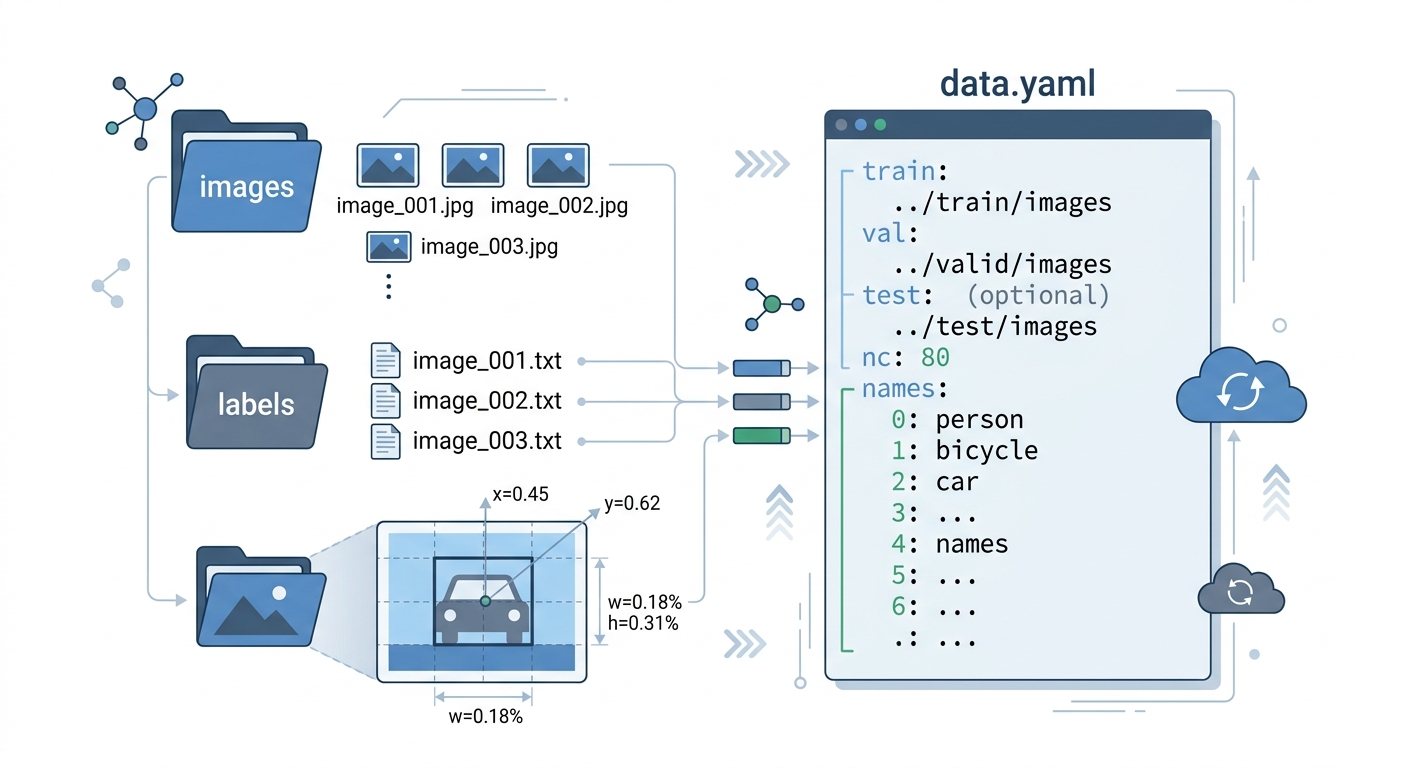
Whether you are formatting custom data using Python scripts or configuring enterprise-grade data labeling pipelines, adhering to standard directory hierarchies and coordinate normalization protocols prevents costly re-indexing and training failures. Here is the definitive engineering guide to structuring, formatting, and validating your custom data for YOLOv8.
Understanding the YOLOv8 Dataset Format: Architecture and Logic
The YOLOv8 framework expects a decoupled architecture where source imagery and geometric labels reside in parallel directories. Unlike consolidated single-file annotation formats such as COCO JSON or Pascal VOC XML, YOLOv8 isolates individual image annotations into plain-text (.txt) files. Each text file shares the identical base filename of its corresponding image.
To configure your training session, YOLOv8 relies on a central metadata manifest: the dataset YAML file. By reading this configuration, the underlying loader resolves image paths, locates training and validation splits, matches bounding box files, and maps numeric class indices to human-readable strings.
The 7 Essential Rules for Structuring Your YOLOv8 Training Data
Rule 1: Build Symmetrical Image and Label Directory Hierarchies
YOLOv8 uses automated string resolution to discover label files from image paths. By default, the dataset parser inspects the file path of an image and swaps the directory name images with labels to locate the corresponding bounding box file. If your folder structure does not follow this symmetry, the loader will flag images as missing annotations.
Structure your dataset root directory strictly following this blueprint:
- dataset_root/
- data.yaml (Central dataset configuration file)
- images/
- train/ (Raw images: .jpg, .png, .bmp)
- val/ (Validation set images)
- test/ (Optional holdout evaluation images)
- labels/
- train/ (Matching annotation files: .txt)
- val/ (Matching validation annotation files)
- test/ (Matching test annotation files)
Ensure that an image named frame_001.jpg inside images/train/ maps strictly to frame_001.txt inside labels/train/. Any naming divergence causes the loader to treat the image as an unannotated background frame.
Rule 2: Store Bounding Boxes in Normalized Center Coordinates (xywh)
Every non-empty label file contains one or more lines representing detected objects. Each line corresponds to an individual ground-truth bounding box and must adhere to a strict space-delimited structure:
class_index x_center y_center width height
All spatial dimensions must be normalized relative to the original image dimensions, resulting in floating-point values ranging strictly from 0.0 to 1.0. This normalization makes the coordinates scale-invariant, allowing YOLOv8 to dynamically resize images during multi-scale training without corrupting spatial coordinates.
| Field | Type | Description | Permitted Range |
|---|---|---|---|
| class_index | Integer | Zero-based numerical identifier of the object class | 0 to N-1 |
| x_center | Float | Horizontal center of bounding box divided by image width | 0.0 to 1.0 |
| y_center | Float | Vertical center of bounding box divided by image height | 0.0 to 1.0 |
| width | Float | Absolute box width divided by image width | 0.0 to 1.0 |
| height | Float | Absolute box height divided by image height | 0.0 to 1.0 |
Rule 3: Calculate Normalization Using Exact Pixel Conversions
When converting raw bounding box coordinates from pixel-based annotation formats (such as xmin, ymin, xmax, ymax) into the YOLOv8 format, precision matters. Sub-pixel rounding errors or inverted bounding boundaries will generate inaccurate anchor allocations during training.
Use the following mathematical formulas to transform pixel coordinates into normalized coordinates:
- x_center = ((x_min + x_max) / 2) / image_width
- y_center = ((y_min + y_max) / 2) / image_height
- width = (x_max – x_min) / image_width
- height = (y_max – y_min) / image_height
Verify that your calculation bounds fall strictly within [0.0, 1.0]. Values exceeding 1.0 or dropping below 0.0 indicate corrupted bounding coordinates or boxes drawn outside the frame boundaries, which will crash the PyTorch data loader.
Rule 4: Enforce Zero-Based, Contiguous Class Indexing
One of the most frequent setup bugs during a YOLOv8 training custom dataset workflow involves class indexing mismatches. YOLOv8 utilizes zero-based indexing for all object classes.
If your model detects three categories (such as forklift, worker, and pallet), the respective class IDs must be 0, 1, and 2. Introducing arbitrary non-contiguous IDs (e.g., using 1, 2, and 5 from a legacy database schema) causes array index out-of-bounds exceptions during loss computation or allocates redundant memory for non-existent categories.
Rule 5: Define an Explicit data.yaml Configuration
The data.yaml configuration YOLOv8 file bridges your directory layout with the training engine. It must declare the absolute or relative dataset root path, directory paths to your training and validation splits, and a structured class index mapping.
A robust dataset configuration file should be formatted as follows:
- path: /absolute/path/to/dataset_root (or path relative to the run execution folder)
- train: images/train (relative to the path definition above)
- val: images/val (relative to the path definition above)
- test: images/test (optional)
- names: A key-value dictionary mapping every zero-based class integer to its label name, such as {0: ‘vehicle’, 1: ‘pedestrian’, 2: ‘cyclist’}.
Ultralytics supports defining names as a list of strings or as a dictionary. Using an explicit dictionary mapping (e.g., 0: vehicle) is recommended for production environments to eliminate ambiguity during class updates.
Rule 6: Preserve True Background Images with Zero-Byte Label Files
In real-world computer vision tasks, such as security and surveillance vision systems, false positives present a critical performance challenge. To teach the model what constitutes background noise (regions containing zero targets of interest), you must intentionally include negative background samples in your training set.
In the YOLOv8 dataset format, an image containing zero target objects must have an accompanying, completely empty (0-byte) .txt label file. If you omit the text file entirely, the loader treats the file as missing or corrupt rather than registering it as an empty ground-truth frame. Including 5% to 10% background imagery with empty label files significantly reduces false-positive detection rates.
Rule 7: Scale From Manual Annotation to Automated Data Pipelines
While prototyping on dozens of images can be handled locally, training reliable production models requires thousands of verified edge-case samples. Maintaining consistent pixel precision across team members demands strict standard operating procedures for professional bounding box annotation.
To scale efficiently without compromising dataset fidelity:
- Adopt strict annotation taxonomies: Define detailed edge-case handling for occluded, cropped, or blurry objects before labeling starts.
- Establish consensus-driven validation: Implement multi-pass quality control checks where senior annotators audit tight box margins and spatial overlap metrics.
- Automate label sanitization: Run continuous integration checks on your dataset repositories to verify bounding boxes are strictly normalized between 0.0 and 1.0, contain valid class IDs, and match image aspect ratios.
- Partner with certified data teams: For large-scale proprietary models, partnering with an ISO 27001:2013 certified annotation vendor guarantees enterprise data security, SOC compliance, and audit-ready dataset delivery.
Troubleshooting Common YOLOv8 Dataset Errors
When launching training commands via the terminal or Python API, errors often trace back to formatting flaws. Consult this checklist if your training job fails:
- Zero labels detected: Check your directory naming conventions. Ensure your folders are named exactly images and labels. If your directory is named img or annotations, YOLOv8 will not automatically resolve the paths.
- Loss displays NaN: This typically indicates that coordinate bounding values exceed normalized ranges. Run a python audit to confirm that no x_center, y_center, width, or height values fall below 0.0 or above 1.0.
- Label file missing warning: Confirm that non-object background frames contain a corresponding 0-byte .txt file sharing the exact filename prefix of the source image.
- Label index out of bounds: Inspect your data.yaml. Ensure the highest numeric class ID in your text files is strictly lower than the total number of entries defined under the names dictionary.
Frequently Asked Questions
How do you prepare a custom dataset for training YOLOv8?
To format training data for yolov8 object detection, aggregate your source images and partition them into train, validation, and test splits (typically an 80/10/10 split). Generate corresponding text files containing normalized class indices and center-based box coordinates (xywh) for every frame. Finally, author a data.yaml file establishing your split paths and class name dictionaries.
What are some good benchmark training datasets for object detection?
Industry-standard evaluation datasets include the COCO dataset (Common Objects in Context), Pascal VOC, and Open Images. For domain-specific evaluation, teams frequently leverage public datasets such as Cityscapes for autonomous driving or VisDrone for aerial surveillance benchmarks.
How do you train an object detection model with YOLOv8?
Once your dataset follows the YOLOv8 format, initiate training using the Ultralytics CLI or Python module. Point the training invocation to your dataset manifest: yolo task=detect mode=train model=yolov8n.pt data=data.yaml epochs=100 imgsz=640. For advanced training parameters and hyperparameter tuning options, refer to the official Ultralytics documentation.
How should edge cases and tight overlaps be labeled for YOLOv8?
Bounding boxes should fit tightly around visible boundaries of targets without capturing excessive background padding. For partially occluded objects, annotate the estimated bounds of the visible portion only, unless your model requirements specifically dictate predicting full contextual boundaries. If your pipeline requires production-grade precision at massive scale, contact our annotation engineering team to set up secure, audited human-in-the-loop workflows.