
Off-the-shelf vision benchmarks like COCO or Pascal VOC are invaluable for prototyping, but enterprise computer vision models fail when deployed against real-world distributions. A warehouse sorting arm cannot rely on general cat-and-dog classifiers, and an ADAS system cannot depend solely on generic pedestrian sets when encountering harsh weather or complex occlusions. Creating a resilient, production-grade custom object detection dataset requires an engineering-driven workflow that balances statistical sample size, rigorous annotation standards, and stringent data security.
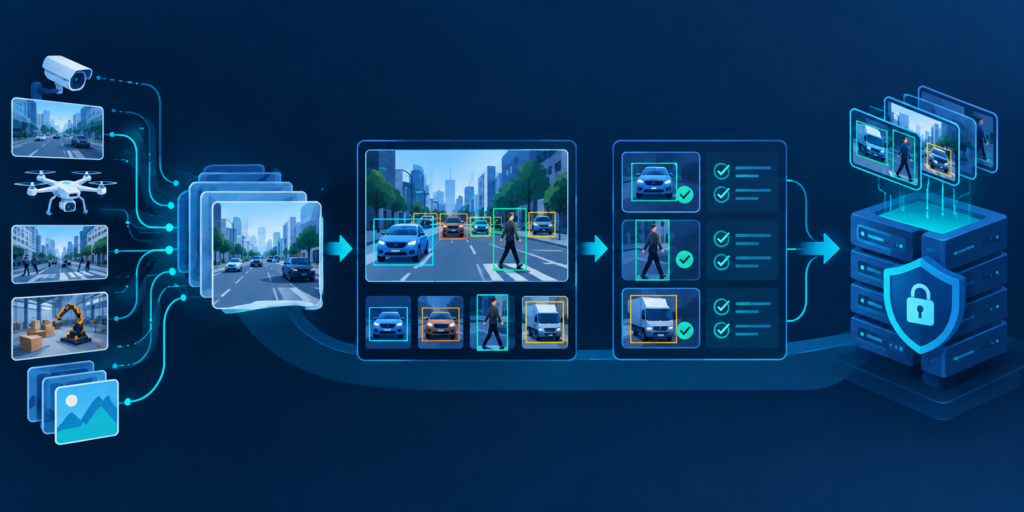
The Core Challenges of Real-World Computer Vision Datasets
Most machine learning models degrade in production not because of model architecture flaws, but because of data distribution shifts. When teams attempt to understand how to build a custom dataset for object detection, they often underestimate the downstream friction caused by ambiguous class taxonomies, sensor mismatches, and poor edge-case coverage.
A production-ready dataset requires answering specific operational questions before annotating a single frame:
- How many bounding instances per class are mathematically sufficient to reach target mean Average Precision (mAP)?
- How should annotators handle severe visual overlap, boundary ambiguity, and partial occlusion?
- How do we scale from hundreds of images to hundreds of thousands without linear cost expansion?
- Are proprietary images protected under compliant information security standards such as ISO/IEC 27001?
7 Steps to Build a Custom Object Detection Dataset
Whether you deploy lightweight edge models or heavy multi-stage detectors, preparing custom object detection datasets requires following a repeatable, seven-step engineering discipline.
Step 1: Define Taxonomies and Calculate Dataset Size
Before sourcing imagery, write an unambiguous annotation specification. Ambiguity between visually adjacent classes (such as “sedan” versus “coupe” or “jacket” versus “coat”) introduces label noise that depresses convergence rates.
To calculate dataset size requirements without guessing, evaluate three core variables: intra-class variance, spatial scale variance, and environmental diversity.
| Class Variance Level | Visual Characteristics | Recommended Minimum Instances per Class |
|---|---|---|
| Low Variance | Rigid geometry, uniform texture (e.g., manufactured bolts, retail barcode labels) | 250 – 500 instances |
| Moderate Variance | Semi-rigid shapes, moderate color variety (e.g., pallet jacks, traffic signs) | 700 – 1,500 instances |
| High Variance | Deformable shapes, varied poses, high occlusion (e.g., pedestrians, livestock) | 2,500 – 5,000+ instances |
Keep class distribution ratios within a 3:1 margin between dominant and rare classes whenever feasible. When natural distributions are heavily long-tailed (such as rare roadway hazards or manufacturing defects), reserve targeted synthetic generation or prioritized data mining specifically for underrepresented classes.
Step 2: Collect Raw Data and Engineer Edge Cases
A dataset composed exclusively of centered, well-lit, unobstructed targets creates brittle models. The collection phase must actively seek sensor variance, varied resolutions, optical distortions, and atypical lighting conditions.
For video streams, implement frame-sampling strategies that discard consecutive, redundant frames (e.g., using keyframe extraction or perceptual hashing) to avoid training on near-identical frames. If you need dynamic scenes or temporal sequence annotations, leverage structured video recording and labeling protocols to preserve temporal coherence.
Explicitly incorporate occlusion scenarios during acquisition:
- Partial Occlusion (10%–40% covered): The target remains identifiable by distinct local features. These instances must be captured across different angles.
- Heavy Occlusion (40%–75% covered): Only limited semantic regions are visible. Annotators require strict bounding rules (bounding only visible pixels versus modal/amodal bounding).
- Truncation: Targets clipped by image boundaries require distinct metadata flags so loss functions do not penalize partial feature maps.
Step 3: Establish the Annotation Schema and Spatial Bounds
Choose the correct spatial representation for your inference requirements:
- Axis-Aligned Bounding Boxes: Ideal for high-throughput detection pipelines. Precise edge margins matter: boxes should touch the outermost visible pixel without extraneous background noise. Review standards for bounding box annotation to maintain consistent spatial fidelity.
- Rotated / Oriented Bounding Boxes (OBB): Crucial for aerial surveillance, maritime tracking, and dense logistics where standard boxes overlap excessively.
- Polygonal Outlines: Required when precise pixel footprints are mandatory to differentiate overlapping parts or irregular boundaries.
Step 4: Scale Labeling via Hybrid and Automated Workflows
Manual human labeling across 100,000 frames is cost-prohibitive and slow. Modern production teams employ a hybrid annotation pipeline:
- Zero-Shot / Foundation Model Pre-labeling: Pass raw imagery through foundational vision models or open-vocabulary detectors to generate candidate bounding boxes.
- Confidence Tiering: Route predictions with confidence scores above 0.90 to rapid human verification queues; route scores between 0.40 and 0.89 to standard human editing; and flag low-confidence or conflicting scores for multi-annotator consensus.
- Human-in-the-Loop (HITL) Quality Gate: Human annotators correct edge boundaries, classify truncated features, and resolve edge cases.
- Model Re-training Loop: Use verified batches to fine-tune task-specific models that take over subsequent pre-labeling passes with higher accuracy.
Step 5: Implement ISO 27001-Compliant Data Security
Training sets for sectors like defense, healthcare, insurance, or autonomous vehicles contain sensitive, proprietary IP or personally identifiable information (PII). Uncontrolled labeling pipelines introduce critical compliance risks.
When structuring your internal storage or working with an external labeling partner, enforce enterprise governance:
- Role-Based Access Control (RBAC): Annotators should only access isolated micro-batches assigned to their queue, with zero bulk-download permissions.
- Network Isolation & Air-Gapping: Use secure cloud annotation environments that prevent local disk caching, clipboard transfers, or external screen captures.
- SOC 2 & ISO 27001 Certification: Ensure the data labeling vendor operates under audited information security management systems (ISMS), ensuring data integrity, non-disclosure compliance, and rigorous audit logging.
Step 6: Preprocess, Augment, and Convert Formats
Once annotations are validated, convert labels into the target model’s expected format. Standard public formats include COCO JSON (which stores unified bounding coordinates, categories, and image metadata) and Pascal VOC XML.
If you are exploring how to create custom dataset for YOLO architectures (such as Ultralytics YOLOv8 or YOLOv9), each image requires a paired .txt file containing normalized coordinates according to the official Ultralytics YOLO documentation:
<class-index> <x_center> <y_center> <width> <height>
All coordinates must be normalized relative to image dimensions (values ranging from 0.0 to 1.0). When applying offline augmentations (such as mosaic compositions, perspective warps, or color jitter), verify that the transformed bounding boxes still tightly encase target boundaries without falling outside image borders.
Step 7: Partition Splits and Maintain Continuous Validation
Split your curated dataset into canonical training, validation, and test subsets. Standard partitions are typically 70/15/15 or 80/10/10.
Avoid random sampling splits across video data or continuous sensor collections. If frame #101 is in the training set and frame #102 is in the test set, the model will demonstrate artificially inflated validation metrics due to data leakage. Instead, use stratified, group-based splits grouped by scene, sequence, or recording timestamp.
Continuously audit your dataset using Inter-Annotator Agreement (IAA) calculated via Intersection over Union (IoU). Setting a baseline IoU threshold of ≥ 0.75 for human verification guarantees that boundary drift does not degrade your loss functions.
Frequently Asked Questions
How do I prepare a dataset for object detection?
Preparing a dataset requires collecting high-resolution imagery that reflects your production environment, defining rigid annotation guidelines for every class, annotating targets with tightly bound coordinates, validating quality via automated IoU checks, and exporting the data into model-compatible formats (such as YOLO TXT or COCO JSON).
How to build a custom dataset?
To build a custom dataset from scratch: determine target classes and metrics, capture raw data across diverse environmental conditions, filter redundant frames, apply consistent annotations (internally or via managed annotation partners), verify data distributions, and partition into stratified train, validation, and test splits.
Is YOLO better than OpenCV?
YOLO and OpenCV serve different roles. OpenCV is an open-source computer vision library used for image transformations, filtering, and running basic classical vision algorithms. YOLO is a deep learning object detection architecture designed for real-time localization and classification. Modern pipelines frequently use OpenCV to capture, preprocess, and stream images into a YOLO model for inference.
What is the best dataset for object detection?
For benchmarking general models, the COCO (Common Objects in Context) dataset is the industry standard due to its broad range of common categories and complex scenes. However, for real-world enterprise applications, the best dataset is a purpose-built custom dataset tailored to your specific camera sensors, target taxonomy, and edge-case distribution.
Building Production-Ready Vision Data
Constructing a high-performing vision model depends far more on data quality than hyperparameter tuning. By establishing strict class bounds, structuring hybrid automated workflows, and safeguarding proprietary data under audited security frameworks, enterprise teams build models that perform reliably from lab validation to field deployment.
If your team is scaling proprietary vision systems and requires secure, high-precision training data, contact our annotation specialists to discuss your pipeline specifications.